


Tuning Club Online: Car Racing
4.64.44K Reviews
App Specs
- Version
- 2.8460
- Updated On
- License
- Free
- Downloads
- 10,000,000+
- Developer
- Two Headed Shark FZCO
- Categories
- Racing
- Platform
- Android, iOS
Screenshots

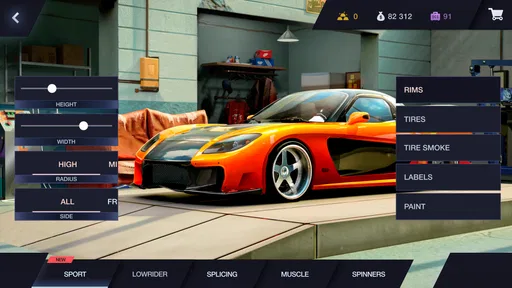

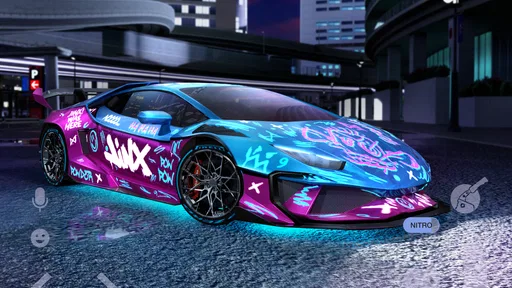
 Analysis by AppCompare
Hey there, fellow speed enthusiast! If you're anything like me, always on the lookout for the next thrilling racing game, then you might want to rev your engines for Tuning Club Online. This game caught my attention with its promise of real-time racing and a robust car tuning experience. I downloaded it with high hopes, and let me tell you, it didn’t disappoint!
What to expect from the driving
I’d describe Tuning Club Online as a racing game for people who enjoy both the run and the garage time around it. A quick session can be about trying to keep a car under control; a longer one can turn into comparing setups and deciding what to change next. That mix is the main reason I’d pick it over a racer that only asks me to choose a vehicle and drive.
It’s also worth setting expectations before you install. This is a mobile game, so I wouldn’t come to it expecting the presentation or simulation depth of a major console racer. Its appeal is more immediate: racing, drifting, tuning, and the chance to meet other players in the same space. If you want a quiet, purely solo experience, the online emphasis may not be your first choice.
Getting Started with Tuning Club Online
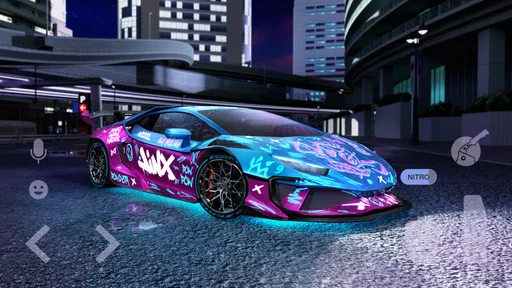
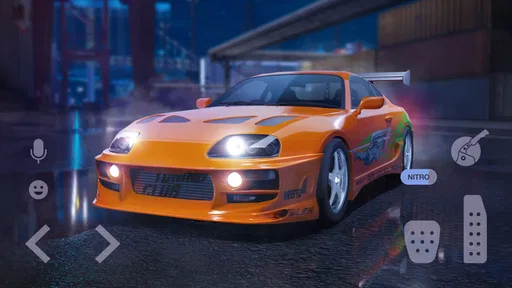
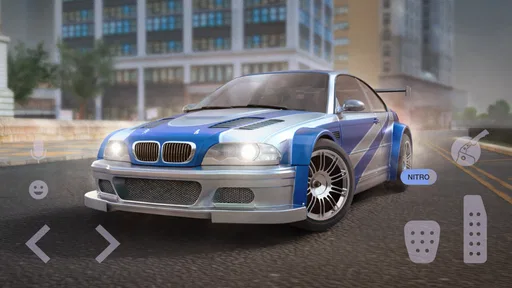
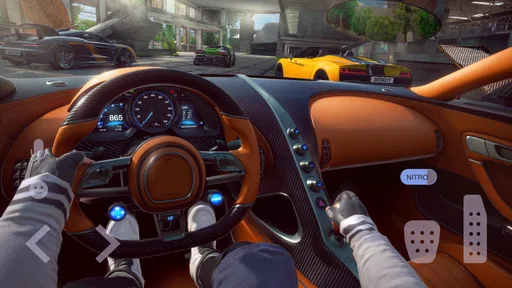
First things first, the download and installation process was smooth sailing—no hiccups or unnecessary wait times. Once I fired it up, I was greeted by a sleek, user-friendly interface. The game quickly immerses you into the vibrant world of car racing, and the graphics are pretty impressive. It's not exactly Forza-level, but for a mobile game, it definitely holds its own. The attention to detail in the car models is evident, and it feels like the developers put a lot of love into this.
Before your first race
For a first-time player, my practical advice is to treat the opening minutes as a familiarization lap rather than a test of skill. Find the control layout that feels comfortable, then take a little time to notice how steering and acceleration respond before chasing a clean finish. Small corrections are easier to learn when you’re not also trying to beat another player. I found that approaching a new car this way made it less frustrating to understand what the tuning changes were doing.
The game is free to start, and Two Headed Shark DMCC is the developer. It has a 4.7 average from around 337,000 ratings and over 10 million installs, so it clearly has an established audience. It is rated for Everyone, and the current version is 2.7375. Optional in-app purchases range from $2.99 to $89.99 per item, so I’d decide in advance whether I’m happy to progress without spending rather than treating a purchase as a shortcut to make a new car feel manageable.
Gameplay Mechanics
The core of Tuning Club Online is its multiplayer racing feature. You can race with friends or random players globally. The real-time aspect adds a competitive edge that keeps you on your toes. The controls are intuitive, which is always a bonus. I mean, who wants to fumble around with complex controls when you're trying to outrace someone?
Worth Reading Before You Choose

EA SPORTS FC Mobile 26 Is a Bigger Football Game, but It Takes Time

Flipboard Shows What News Apps Must Do Beyond the Feed

Switching to Android Auto Means Rethinking Your Driving Routine

Google Calendar Makes a Crowded Week Easier to Manage

Ludo King Makes the Most of the Minutes Between Plans

Baby Panda World Brings Quick Play to Modern Phones, but Its Game Library Feels Busy
My first satisfying milestone would be finishing a run while keeping the car predictable, not immediately winning a close contest. That gives me a baseline: I can tell whether a later adjustment actually helps instead of changing several things and guessing. If drifting is the draw, I’d focus on learning the feel of a turn first; if straightforward racing is what I want, I’d prioritize steady control and make tuning changes gradually.
Customization and Features
Speaking of customization, let's dive a bit deeper. The game offers a wide array of parts and upgrades. Want to swap out your tires for something with more grip? Go for it. Thinking about adding a turbocharger? It’s all possible. The tuning aspect is incredibly satisfying, allowing you to tailor your car to your racing style.
One useful habit is to change one thing at a time and then drive again. It’s tempting to adjust multiple parts because the garage invites experimentation, but that makes it difficult to tell which change improved a run and which one made the car harder to handle. I’d keep a mental note of a setup that feels dependable before trying a more aggressive one. That way, experimentation stays fun rather than turning into a string of confusing resets.
The game also includes different modes like Drift, Drag, and Race. Each mode has its unique challenges and requires different tuning tweaks to optimize performance. This variety keeps the game fresh and engaging. I found myself switching modes frequently to keep things interesting.
Choosing a mode and a routine
Those modes give the game a useful rhythm for short sessions. If I have only a few minutes, I can pick one style of driving and work on a single goal, such as holding a cleaner drift or getting a more controlled drag run. When I have longer, I can move between modes and see how a setup that feels comfortable in one behaves in another. I wouldn’t assume one tune is automatically ideal everywhere; part of the appeal is noticing that different driving goals ask for different compromises.
A realistic way I’d fit it into a day is to play a couple of runs while waiting for a ride or taking a break, then save the longer tuning session for when I can concentrate. The quick races suit a brief pause, but experimenting with parts and learning how the car reacts rewards a little patience. If I’m tired or distracted, I’d stick to casual driving rather than treating multiplayer competition as a serious test.
Community and Social Features
Another great aspect of Tuning Club Online is its social features. You can join clubs, chat with other racers, and participate in club races. It feels like a vibrant community where you can share tips, boast about your latest upgrades, or just have some friendly banter. Racing against friends adds a personal touch that's both fun and competitive.
Clubs are most useful when I want more than a one-off match: they give me a reason to compare approaches with familiar players and return to a shared activity. I’d still treat chat as optional. Someone who prefers to keep a racing game self-contained can focus on driving, while a player who enjoys friendly rivalry can use the social side to make the sessions feel more personal. That distinction matters if you’re choosing between this and a strictly solo racer.
The developers do a good job of keeping the community engaged with regular updates and events. There's always something new to look forward to, whether it’s a new car model or a special event.
Where it fits among mobile racers
Compared with the usual mobile racing alternatives, this is a better fit for someone who wants tuning to be part of the routine rather than a small menu between races. A more arcade-focused racer may be easier to pick up when all I want is a quick burst of speed, while a track-focused driving game may suit someone who cares most about precise laps and a more serious simulation feel. Here, I get more value from alternating between driving styles and adjusting the car to suit them.
That breadth has a trade-off: players who dislike menus, experimentation, or online competition may find the garage and community side less appealing than simply selecting a race and getting on with it. I’d also avoid changing parts just because an upgrade is available. A car that feels controllable can be a better choice for learning than a setup that looks more powerful but makes every corner harder to manage.
Common points of confusion
One thing I’d keep in mind is that a customization option isn’t automatically a universal improvement. More grip, a different power setup, or a change intended for one mode can alter how the car feels elsewhere. When a run goes badly, I’d first check whether I’m asking the car to do something different from the setup I’ve built, then adjust gradually instead of rebuilding everything at once.
Another likely question is whether spending is necessary. The game is free to download, but it does offer in-app purchases, so I’d treat optional spending as a personal choice and avoid buying anything before I understand what I actually enjoy. For a newcomer, learning the handling and finding a preferred mode are more useful first steps than rushing into purchases. The minimum OS requirement is 7.0, which is helpful to check before installing on an older device.
If the first multiplayer race feels tougher than expected, I wouldn’t take that as proof the game is not for me. Online opponents add pressure, and even familiar controls can feel different when I’m reacting to another driver. I’d practise until I can make consistent turns, then return to competition with one clear aim. That small reset makes the learning curve feel more manageable.
Who I’d recommend it to
I’d recommend it to players who like making a car feel personal, enjoy trying different kinds of driving, and don’t mind that multiplayer is part of the experience. It is especially appealing if tuning itself sounds entertaining rather than like a chore. A newcomer does not need to master every option at once; picking one mode, making one sensible adjustment, and comparing the next run is a practical way to build confidence.
I’d suggest skipping it if you want a completely offline, low-interaction racer, or if your main priority is a highly realistic track simulation. It may also be a poor match if you dislike adjusting setups and would rather have every car behave predictably without much input. In those cases, a simpler arcade racer or a focused solo driving game is likely to feel more direct.
Final Thoughts
All in all, Tuning Club Online is a fantastic racing game that offers a rich, customizable experience. It combines the thrill of racing with the satisfying depth of car tuning. Whether you're in it for the speed, the customization, or the community, there's something here for every car enthusiast.
So, if you're itching for the kind of adrenaline rush only a good racing game can provide, give Tuning Club Online a spin. Who knows, you might just become the next king of the asphalt!
Pros
- Real-time multiplayer racing experience.
- Extensive car customization options.
- Regular updates and new features.
- Vibrant community and active forums.
- Cross-platform play available.
Cons
- In-app purchases can be pricey.
- Occasional connection issues.
- Learning curve for new players.
- Some cars locked behind paywall.
- Graphics demanding on older devices.
FAQs for Tuning Club Online: Car Racing
What is Tuning Club Online: Car Racing?
Tuning Club Online: Car Racing is a multiplayer racing game that allows players to compete in real-time against others worldwide. The game features a variety of customizable cars, enabling players to modify engines, suspension, and visual styles. It's known for its detailed graphics and engaging gameplay, offering a unique car tuning and racing experience.
Is Tuning Club Online free to play?
Yes, Tuning Club Online is free to download and play on both Android and iOS devices. However, the game includes in-app purchases that allow players to buy additional features, car upgrades, and customization options. These purchases can enhance the gaming experience but are not necessary to enjoy the core gameplay.
What are the main features of Tuning Club Online?
The game offers a range of features, including real-time multiplayer racing, extensive car customization options, and various racing modes. Players can enhance their vehicles' performance with engine upgrades, suspension tweaking, and visual enhancements. The game also boasts social features, allowing players to interact and compete with friends.
What devices are compatible with Tuning Club Online?
Tuning Club Online is compatible with most modern Android and iOS devices. It requires a stable internet connection and sufficient storage space for installation. The game runs smoothly on devices with updated operating systems and mid-to-high-range specifications to ensure optimal performance and graphics quality.
Does Tuning Club Online support cross-platform play?
Yes, Tuning Club Online supports cross-platform play, allowing players on Android and iOS devices to compete against each other. This feature enhances the multiplayer experience by broadening the pool of opponents and offering more diverse competition. Players can connect and race with friends regardless of their device platform.


